
Project Date
Summer 2022 -Fall 2023
Role
Lead Designer
Responsibilities
Product Strategy
User Research
UX Design
UI Design
Prototyping
As the sole Product Designer on this initiative, I led the end-to-end design of a new feature in the Condomob app that enables residents of gated communities to manage the access of visitors, service providers, and employees in a seamless, secure, and compliant way.
The goal was to replace fragmented and manual entry processes — like WhatsApp messages or clipboard sign-ins — with a centralized, intuitive digital flow that integrates directly into the app used daily by residents and building managers.
Over the course of the project, I partnered with stakeholders from Product, Engineering, Customer Support, and Condominium Operations to define the real-world constraints of residential security, privacy regulations, and legacy behaviors. I mapped these user and operational needs into an experience that supports:
Visitor pre-registration via app or link sharing
Profile and document capture (including facial photo)
Status indicators for “awaiting visitor action” or “awaiting approval”
Real-time filtering, approval, and sharing mechanisms
Through iterative prototyping and user feedback loops, we identified key usability improvements — such as grouping guests by status (e.g. pending form, awaiting approval), contextual filtering, and onboarding instructions for facial registration — that significantly improved user confidence and adoption.
Before jumping into solutions, we needed to understand what wasn’t working with the existing process of registering and managing external people (visitors, service providers, and staff) in gated communities.
By partnering with our Customer Success and Support teams, who frequently gathered feedback from residents and administrators, we identified recurring frustrations: loss of registration links, incomplete visitor information, difficulty in sharing invites, and uncertainty about visitor status (e.g. pending approval, expired, etc.).
To validate these insights, we analyzed app behavior and user flows from our current “add visitor” feature. We noticed that users were often abandoning the process halfway through, and some profiles were duplicated or lacked key info like document IDs or phone numbers.
With this hypothesis in mind, we initiated exploratory research with both residents and building staff to uncover blockers in the end-to-end experience. Our goal was to understand:
How residents invite and approve visitors today (both digitally and manually)
What information is most essential to capture and verify
Where confusion arises when sharing or managing invitations
How to guide first-time users through required steps like photo capture and document input
These findings directly shaped the redesign, especially around status tracking, flexible registration options (via app or link), and progressive disclosure of required fields.
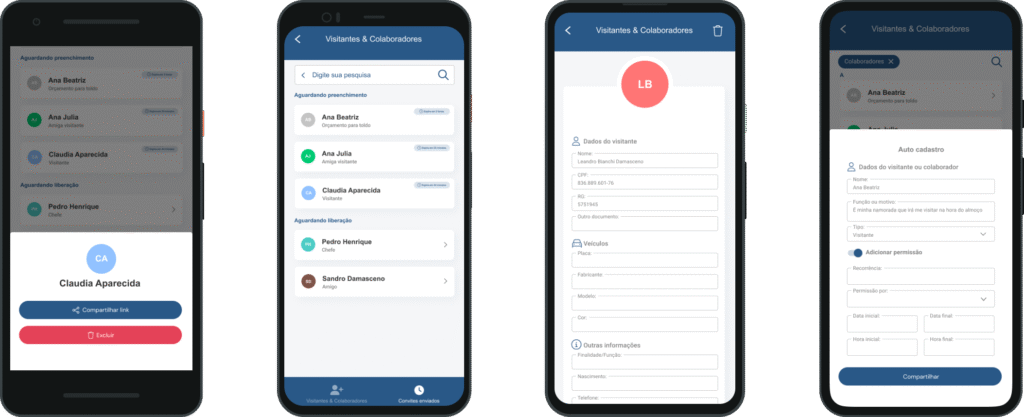
Through user testing, we identified key usability and comprehension issues in the flow for inviting and registering visitors and collaborators.
Key Insights
Opportunities

Increase adoption and streamline registration
We want to increase the usage of the visitor and collaborator registration flow by making it simpler and more intuitive for residents. Whether sending a link or registering manually, users should clearly understand the options and feel confident in the process.
Help residents manage access with less friction
Residents should feel supported when authorizing visitors — not burdened. The flow should reduce guesswork and allow quick configuration of access rules (recurring, temporary, etc.) without confusion or hesitation.
Meet users where they are
We need to ensure this feature appears in the right context. For example, residents often think about granting access when planning deliveries, service appointments, or social visits — so the call to action should align with that mental model.
Set expectations and reduce uncertainty
We need to make the post-invitation and post-registration steps clearer for both parties. What happens after sending a link? Is approval required? Is access active now? Helping users feel in control is key.
Make the experience feel human
Registering someone to access your home is a personal action. We should make space for personalization and context — like naming the reason or relationship — to help the experience feel more relevant and reassuring.
Competitive analysis and concept exploration
With our goals defined and initial research insights in place, I started exploring how other platforms handle the process of managing external access — including guest registration, invite sharing, and identity validation.
I looked at a range of apps across different industries, from delivery management to coworking space access and residential visitor systems. This competitive analysis helped me identify which patterns were most successful when it came to:
Guiding users through data collection steps
Encouraging complete visitor profiles
Enabling flexible sharing (e.g., via link, QR, or native apps)
Clearly showing pending and approved statuses
Armed with these insights, I began sketching and wireframing concepts that could support both the resident and admin experiences within our Condomob ecosystem. I focused on early flows such as:
Quick invite via link or in-app form
Real-time status updates (e.g., “awaiting completion”, “awaiting approval”)
Contextual actions like filtering by visitor type or scheduling future entries
These low-fidelity wireframes became key conversation tools between me, the Product Manager, and the engineering lead. They allowed us to align on technical feasibility and UX direction early on, before committing to high-fidelity UI or backend logic.
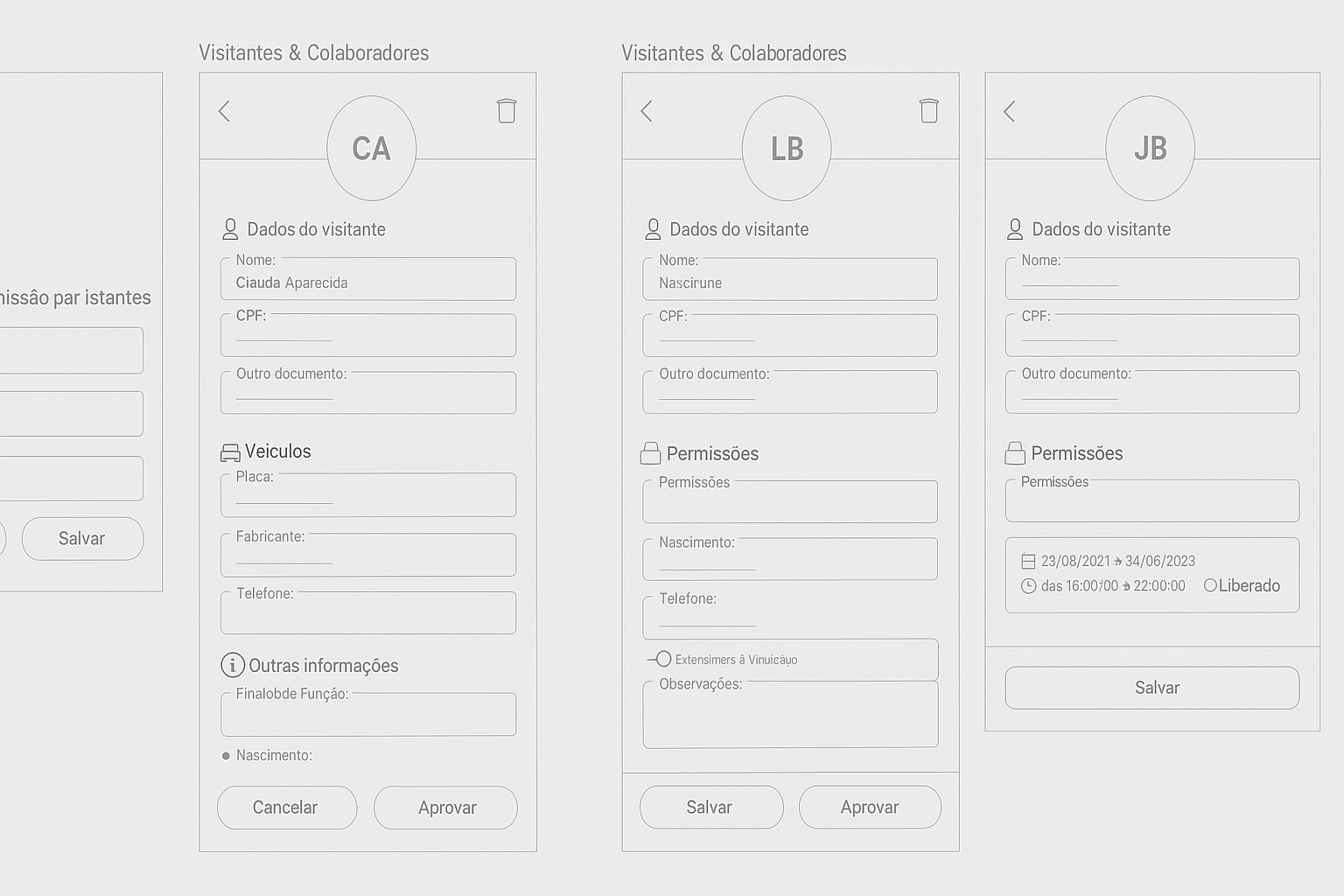
Designing for both the resident and visitor experience
Condomob’s visitor registration feature connects two different user experiences: the resident who creates the invite, and the visitor who receives it. Once we completed the initial design flow for the resident, we began exploring how the invited visitor would engage with the system — from receiving the invite to confirming their access details.
While working through these high-fidelity designs, we also coordinated with product, engineering, and operations teams to align expectations and discuss edge cases like visitor vehicle registration, recurring permissions, and incomplete data scenarios. These conversations were critical in shaping a consistent and connected experience between the resident and visitor sides.
This design phase was not just about the screens, but about enabling a smoother, clearer experience for both parties — one that builds trust and makes access management seamless for everyone involved.
 English
  Portuguese